

AI plans
It asks before it guesses.
If a brief is ambiguous, Autonieer asks up to four short questions — or decides for you if you'd rather. What it assumed is listed plainly, and every sentence of its summary is checked against the drawing.
Autonieer turns a plain-language brief into an editable floor plan and 3D model in millimetres — then lets you refine it like CAD and export it for your consultants.
Free plan · no card · 10 AI generations a month · the editor works without an account

How it works
AI where it's strong — understanding intent and planning space. Deterministic geometry where precision matters.
Write the brief the way you'd tell a colleague. The AI works out the programme and asks up to four questions when the brief is ambiguous; a deterministic solver places walls, doors and windows in exact millimetres.
“3-bed house · 20 × 28 m site · open kitchen”Plan view
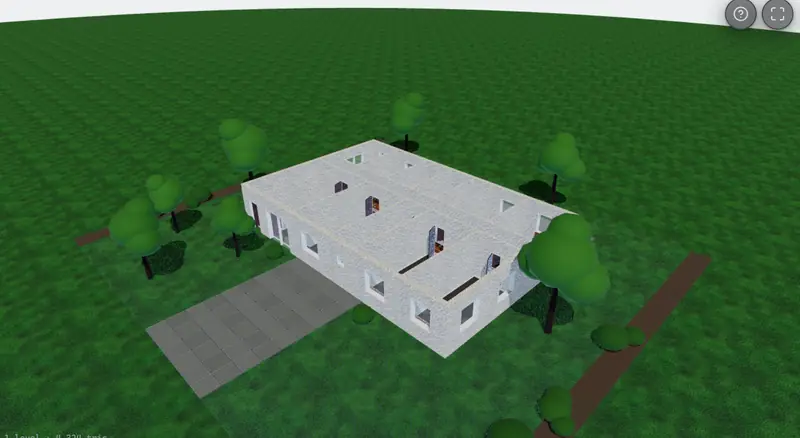
The plan is the model. Edit it like CAD — snaps, layers, dimensions, a command line — or tell the AI what to change, then open the same model in 3D to orbit or walk through.
“make bedroom 2 a metre wider”3D view · same model
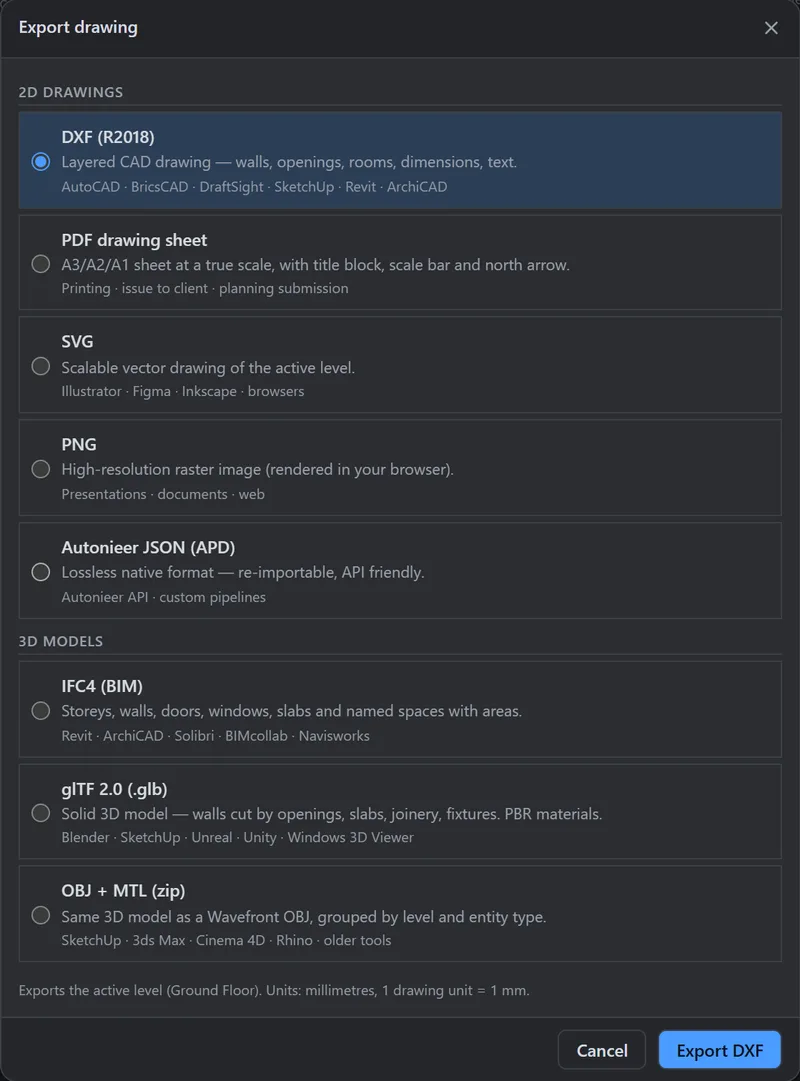
Hand it on as layered DXF, PDF sheets at true scale, SVG, glTF or OBJ — IFC4 on Team — or keep the lossless Autonieer JSON for your own pipeline.
plan.dxf · A-101.pdf · model.glb · plan.ifcExport drawing dialog
The product
AI plans
If a brief is ambiguous, Autonieer asks up to four short questions — or decides for you if you'd rather. What it assumed is listed plainly, and every sentence of its summary is checked against the drawing.
Pro CAD editor
58 tools across a ribbon, tool strip and command line: walls, openings, stairs, dimensions, offset, trim, fillet, arrays, layers and snaps — with AutoCAD-style command aliases such as WALL, OFFSET, COPY and MIRROR.
2D + 3D
The same model in 3D — orbit it, or walk in first or third person and take the stairs between storeys.
Towers
Tall buildings are composed from floor types around one stair-and-lift core, with unit counts per floor — up to 120 storeys.
DXF import · Pro and Team
Bring an existing DXF: walls, openings and rooms are recognised, with the units read from the file.
Exports
DXF with AIA layers, IFC4, PDF sheets at true scale, glTF/GLB, OBJ, SVG and the open plan document.
Learn moreTeams & roles
Organizations with owner, admin, editor and viewer roles, invitations, version history and an audit log on Team.
API · Pro and Team
A REST API with org-scoped keys, idempotency keys and published rate limits — generate plans from your own tools.
$ curl -X POST $API/ai/generations \
  -H "Authorization: Bearer ank_…" \
  -H "Idempotency-Key: 7c1e…" \
  -d '{"prompt": "Two-bed house",
       "options": {"floors": 1}}'
→ 202 Accepted
Honest AI
Assumptions are listed, limits are reported instead of hidden, and the summary is checked against the drawing before you see it. The result is a concept for a qualified professional to develop and review.

A real CAD editor
Dock, split and float every panel. Draw with ortho and object snaps, type coordinates into the command line, manage AIA layers — or ask the AI to revise in place.

From a house to a tower
Towers are composed from floor types — ground, amenity, typical floors, roof plant — around one stair-and-lift core that stays put from bottom to top. Unit counts are honoured exactly.

Specification
No roadmap promises in this table — only what the product does now.
Exports open in or import into: AutoCAD · Revit · SketchUp · ArchiCAD · BricsCAD · Rhino · Blender.
| Input | A plain-language brief. Up to four clarifying questions when it's ambiguous — or “decide for me”. |
|---|---|
| Output | Walls, doors, windows, rooms with areas, and dimension strings — in millimetres, on AIA layers. |
| Building types | Houses, apartment blocks, offices, retail and mixed use; towers up to 120 storeys with basements and attics. |
| Editor | 58 tools and 88 commands: snaps, ortho, layers, dimensions, a command line and a Ctrl+K palette. |
| 3D | The same model in 3D: orbit, or walk through at eye height and take the stairs. |
| Import | DXF — walls from paired lines, openings from blocks, rooms from polylines (Pro and Team). |
| Export | SVG and Autonieer JSON on every plan; DXF, PDF sheets, glTF and OBJ on Pro; IFC4 on Team. |
| Teams & API | Organizations with roles and version history; a REST API with org-scoped keys (Pro and up). |
| Integrations | Plugins for AutoCAD, Revit, Rhino, Figma, Canva and Chrome/Edge are in development. |
| Drawing | AUTONIEER · SHEET A-001 · SCALE 1:100 · REV A |
Security & trust
Early access
There are no customer logos here yet because we'd rather earn them than invent them. If you design buildings, try it on a real brief and tell us what worked, what broke and what you'd need to use it every day — here or in the community forum.
Pricing
Online payments open soon. Pro and Team can't be bought yet — join the waitlist and we'll email you once checkout is live. No card, no charge. Everything in Free works today.
Try the whole loop — describe, generate, edit, export to SVG. DXF and PDF come with Pro.
No card needed
Start freeFor independent architects and designers who hand drawings on.
Billed monthly
For studios that share projects, roles and an audit trail.
Billed monthly, per seat
Volume pricing, invoice billing and custom limits. SSO is on our roadmap — tell us if you need it.
Invoiced, terms agreed with you
Talk to salesPrices in US dollars, excluding VAT and sales tax. Tax isn't calculated at checkout yet — if you need a VAT invoice, contact us first. Team is billed per seat.
FAQ
More in the help centre — or ask Vela, the assistant in the corner.
DXF (R2018, AIA layer names such as A-WALL, A-DOOR and A-GLAZ) opens in AutoCAD, BricsCAD, DraftSight and Rhino and imports into SketchUp and Revit. IFC4 carries storeys, walls, doors, windows and spaces into Revit, ArchiCAD and other BIM tools. glTF/GLB and OBJ open in Blender, SketchUp and most 3D viewers, and PDF sheets print at true scale.
Editable. Every wall, door, window, room and dimension is a vector object with properties — thickness, swing, sill height, layer — that you change in the editor. You can also ask the AI to revise the plan and undo anything it did.
Geometry is stored in whole millimetres. The AI decides the programme and layout; a deterministic solver turns that into walls that meet, doors that fit and rooms that close. The summary you get is checked against the drawing, and anything the AI assumed is listed rather than implied.
Yes. The same model opens in a 3D view you can orbit or walk through (stairs included), and it exports to glTF/GLB, OBJ and IFC4.
Up to 120 storeys. Towers are composed from floor types — ground, amenity, typical floors and roof plant — around one stair-and-lift core. If a brief asks for something beyond a limit, the result says so rather than quietly changing your numbers.
No. Autonieer produces AI-assisted concept designs. A qualified professional must review them and take responsibility for code compliance, structure and anything submitted to an authority. See our AI transparency notice.
You own your designs. They belong to your organization, are isolated from other customers, and can be exported at any time. We do not use your private designs to train AI models.
A hosted large language model plans the programme; our own deterministic solver draws the geometry. When you generate or refine, the model receives your brief and the design context it needs — nothing else. The current provider and model are named in our AI transparency notice and sub-processor list. If the model is unavailable, an offline planner produces the plan and the app tells you.
From the blog
How Autonieer splits the work between a language model and a deterministic solver — and why that split is what makes the drawing trustworthy.
Sheet A-000 · Rev A